
Never be surprised by an integration again
Every Logic App and Function you run including the ones nobody registered, and the ones that exist only as code, found, flagged, and mapped to the data they move. On every deploy. In your tenant.
Runs in your tenant · least-privilege · reads no secrets
The riskiest integration is the one nobody’s tracking
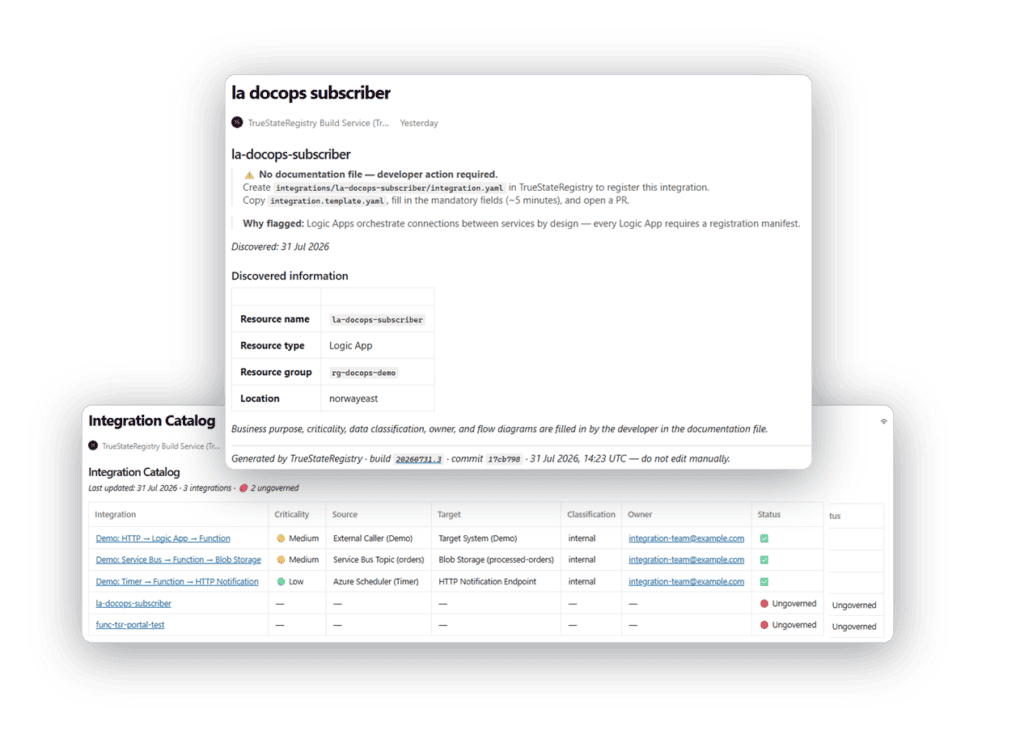
Two years ago someone built a Logic App to push order data to a partner. It worked. They moved on. It still runs every day, still moving customer data to a third party. Nobody owns it. Nobody documented it. And some integrations don’t even show up as running resources yet, a Function sitting in a repo, written and not yet deployed, that no dashboard will ever show you, one pipeline run from production and on nobody’s list. You find out when an auditor asks, when a partner is breached, or when a data request lands and you can’t say where the data went.
Governed, incomplete, or ungoverned, no grey areas
Governed
A manifest exists with an owner and a data classification. Documented, owned, classified.
Incomplete
A manifest exists but is missing an owner or a classification. The exact missing field is flagged wherever it appears.
Ungoverned
A Logic App or Function is running with no manifest at all. Detected live, flagged red, with a page telling the developer exactly what to add.
Most tools only see what’s deployed
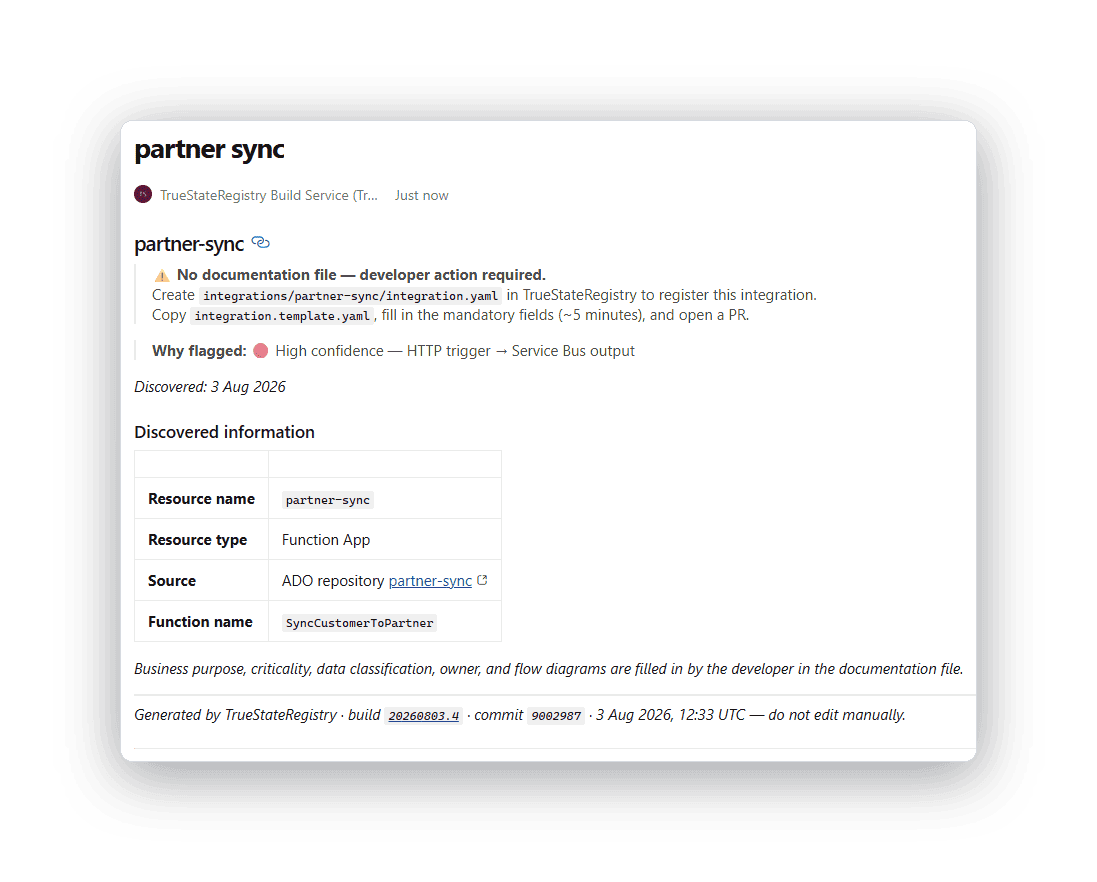
Most tools only see what’s deployed. TrueStateRegistry also scans every repository in your Azure DevOps project for Azure Functions code so it catches integrations that exist only as source and were never deployed, the most likely hiding place for shadow integrations in code-first teams.
Code-first discovery scans repos for the definitive Functions marker and reads the source directly, no git clone, no manual config. New repositories are included automatically on the next run, no setup per repo.
Confidence-scored, not noisy, static analysis classifies each Function by trigger and output. Genuine integrations are flagged, housekeeping and timer jobs are skipped so no false-positive noise.
Live + code, reconciled, Azure-deployed resources and in-repo code are compared against declared manifests on every run. What’s unaccounted for shows up red.
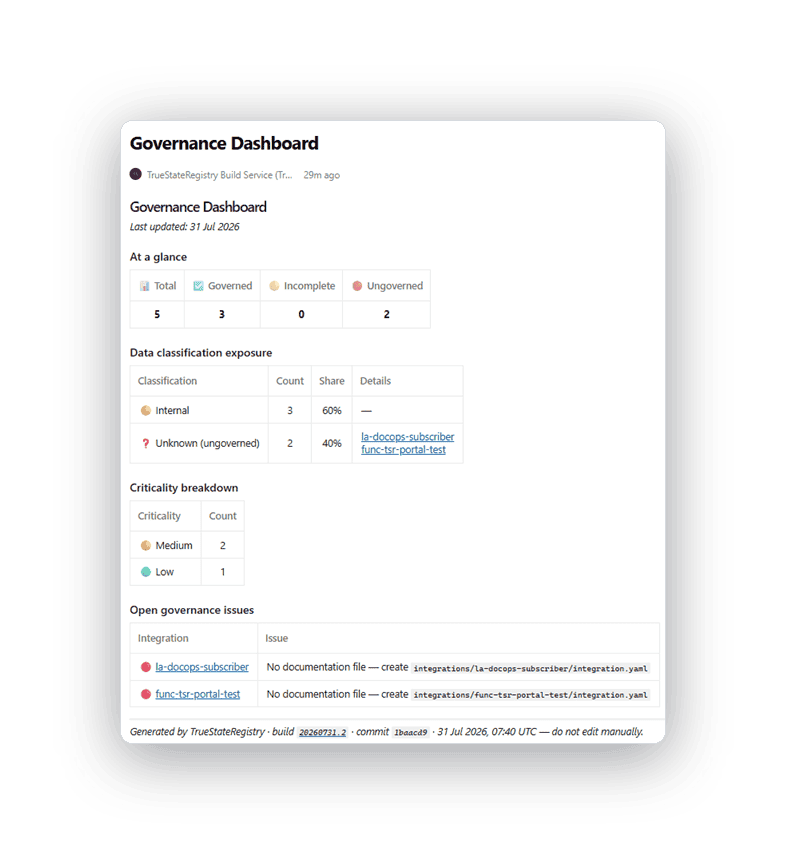
One screen tells you where you stand
Posture at a glance, total integrations, and how many are governed, incomplete, or ungoverned.
Data-classification exposure, Restricted and Confidential integrations named individually. Internal and Public summarised.
Criticality breakdown, critical / high / medium / low, colour-coded for instant prioritisation.
Open governance issues, every gap, with the exact missing field.
How it works
Live in three steps, then automatic
Step 1
Add it to your pipeline. Add it to your Azure DevOps pipeline and point it at your resource groups. No platform to host, no agents.
Step 2
Fill in the stubs. It discovers your Logic Apps, Functions and repos, and opens a pull request with stub manifests. About five minutes each.
Step 3
It runs on every deploy. Every push regenerates your catalog, dashboard, diagrams and pages and flags anything ungoverned.
Runs where your data already lives
In your tenant
Everything runs inside your Azure environment. Nothing is sent to us. No phone-home.
Reads no secrets
Secrets, connection strings, hostnames and tokens are stripped from every output. Optionally, fail the build on any secret detected.
Least privilege
Read-only discovery through your existing pipeline identity.
Verifiable
Every page carries the build ID, commit SHA and timestamp that produced it.
Never more than one deploy behind reality
A registry maintained by hand starts lying the moment something changes and nobody updates it. This one regenerates on every release, so it reflects your estate as of your last deploy, not as of whenever someone last remembered to edit a page. Anything new, or anything running without a manifest, shows up red on the very next run.
FAQs
Be one of our founding customers
Hands-on setup with the engineer who built it, direct input into the roadmap, and locked-in early pricing in exchange for a paid pilot and your feedback.